Why the Calendar Grid File Could Save Your Project—or Ruin It Without Care
That instant download file you just purchased—a calendar grid with flowing script months and clean serif alternates—promises beautiful save the date cards, reusable whiteboard planners, and window displays that actually look intentional. But between the digital download and a finished piece that makes someone pause, there are a handful of quiet mistakes that turn a clever idea into wasted vinyl and time. Once you know where they hide, you can skip the trial and error entirely.
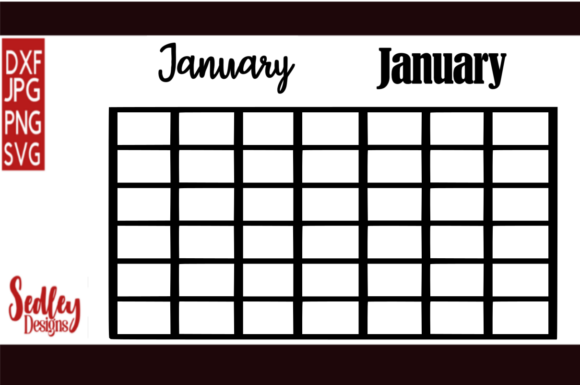
What You Actually Get With This Calendar Grid Download
This listing delivers a digital cut file, not a physical product, designed for Cricut, Silhouette, and similar cutting machines. Inside, you’ll find all twelve months of the year rendered in both a decorative script font and a more structured serif font. You can use the grid as a full-year display, separate just the month you need, or mix the typography to match your event. Because it’s a vector file—often SVG—it scales without losing quality, as long as you lock the proportions. The moment you treat it like a simple shape to drag and drop, things start going sideways.
Resizing Without Locking the Aspect Ratio
It’s the quickest way to distort that beautiful script. A month name like “September” becomes squat or stretched when you drag a corner handle freely. In Cricut Design Space, Silhouette Studio, or any editing software, the lock icon exists for a reason. Click it before any size adjustment. Even a 2% distortion makes the serif numerals look off, and the script loses its natural flow. Measure your intended surface first, then scale the calendar grid to fit proportionally. A digital mock-up on a photo of your wall can prevent a printed cut that looks miniature from across the room.
Assuming One Material Setting Fits All
Choosing “Premium Vinyl” in your machine’s menu and hitting go might work for simple shapes, but this calendar grid combines thick serif strokes with incredibly thin script connectors. The wrong blade depth or pressure either chews up delicate letterforms or refuses to cut cleanly through adhesive. Before committing your good material, run a test cut on a corner of the scrap you plan to use. If the script’s fine loops don’t release from the backing without tearing, increase the blade depth slightly—but do it in small increments. There’s a narrow sweet spot where both the bold and the delicate cut through in one pass.
Forgetting Direction for Windows and Non-Standard Surfaces
Applying a vinyl calendar to a window that people will read from outside means you need to cut it mirrored and adhere it to the inside glass. The same logic applies to heat transfer vinyl on a fabric panel you plan to view from the front. Your machine software has a mirror or flip function; use it. A reversed script month is illegible and frustrating to remove after you’ve squeegeed it onto a smooth surface. For a whiteboard calendar that faces the room, no mirroring is needed, but double-check whether your vinyl is meant for interior or exterior use. Exterior-grade removable vinyl holds up to sunlight and temperature shifts better if it’s near a window.
Weeding Too Aggressively or Too Slowly
Weeding the calendar grid tests your patience—especially the serif figures with their tiny interior counters. Your instinct may be to work fast, but cold vinyl cracks. Let your material sit at room temperature if it was shipped or stored in a cold garage. Work under angled light so you can see the residual film that sometimes stretches across a letter’s eye. Use a fine-tipped weeding tool and start from the center of the design, not the edges. If a script tail lifts with the scrap, press it back down with the tool’s flat side and re-weed the area gently. Rushing here means losing hours of prep to a jagged “a” or a severed descender.
Smarter Ways to Build Save the Dates and Reusable Planners
Once you avoid the basic technical traps, the creative side opens up. The dual-font design isn’t just decorative—it’s a practical tool for visual hierarchy. Use the script month as the headline for a save the date card, cutting it in metallic foil vinyl and placing it over a softly textured cardstock. Let the serif numerals carry the day and year, ensuring no one misreads the date. When the two weights are cut from contrasting materials, the entire piece feels layered and considered, even if it only took an afternoon.
For a whiteboard calendar, resist the urge to cut the entire grid as one solid sticker. Separate the month name, the day headers, and a simple line grid. Apply each element separately to a glass pane or painted whiteboard wall. This way, when a new month rolls in, you just replace the month name and renumber with a dry-erase marker. It keeps the wall tidy and reduces vinyl waste. Test a small removable vinyl patch in a hidden corner of the board before committing; some low-tack adhesives become stubborn after a full year of marker contact and erasing.
Applying the grid to a window demands careful transfer tape selection. The delicate script needs a low- to medium-tack transfer tape. High-tack tape can cling so firmly that pulling the design off the backing becomes a battle, often leaving behind thin flourishes still stuck to the tape. When you do lift the design, burnish the tape firmly onto the vinyl, then peel the backing away slowly at a sharp angle. On the window, use a scraper wrapped in a soft cloth to press out bubbles without scratching the glass.
What to Check Before You Download or Purchase
Not all calendar grid files are equal, and a quick check saves regret. Start with file formats: the listing should mention SVG, DXF, or EPS for cutting machines, and possibly PNG for print mockups. SVG is your primary friend. Confirm the design is fully converted to paths—meaning the fonts are outlined, not editable text that your software might substitute with a default typeface. Nothing deflates momentum faster than opening a file to find Arial where script should be.
Look at the grid’s structure. Some files deliver the full year on a single canvas; others give you each month individually. If you only need one month at a time, individual files reduce material waste. Also, check the license: if you plan to sell save the date cards or custom planners at your small business, verify that commercial use is allowed. Finally, before you click “buy,” measure the space where the calendar will live. A grid that looks generous on your screen may be only 8 inches wide when cut—too small for a family whiteboard where readability from six feet away matters.
Stretching the Idea Beyond the Obvious
The same calendar grid file can do more than mark dates. Use stencil vinyl to etch the month names onto a glass jar or mirror with etching cream, creating a permanent, dishwasher-safe pantry planner. Cut the serif months from magnetic sheet material and arrange them on a metal filing cabinet for a modular family calendar. If you’re an educator, print the grid onto transparency film and overlay it on a classroom whiteboard, swapping out the script month each season. Because the download is perpetually yours, you can repurpose it across projects without paying again.
Making the Instant Download Work for You Long-Term
After you set up the file correctly once, save your project within your cutting software—name it with the date, material, and size. Next year, when another wedding save the date request arrives or you want a fresh wall planner, you open that file, adjust the month, and cut without recalibrating. This habit prevents the slow drift of settings and scaling that happens when you start from scratch each time. For small business owners, keep a library of material samples with small test cuts of the script and serif so you can quickly show clients what gold foil versus matte black looks like on cardstock.
The Subtle Difference Between Homemade and Handcrafted
The gap between a project that looks like a first try and one that looks intentional often lives in the finishing steps. Once you apply the vinyl calendar, let it rest for a few hours before erasing or handling it; the adhesive bond strengthens over time. If you’re using a window, clean the glass thoroughly with isopropyl alcohol and a lint-free cloth beforehand—any speck of dust becomes a permanent bump under the vinyl. Stand back and scan the alignment before you peel away the transfer tape for good. A grid that tilts by even a degree reads as careless on a wall display.
Work in good light, the kind that reveals every micro connection between letters. A desk lamp angled from the side exposes those nearly invisible vinyl threads that survive a cut. Snip them with the very tip of your weeding tool rather than pulling, which can yank half a character with it. These small moves add up, and the calendar grid will look as polished as any store-bought planner, except it fits your exact space and style.